How I Code With Agents Agentic LLMs for software engineering
Disclaimer. This is my opinion, based on what I actually use day to day to build software. AI changes almost every week.
Definitions
- Agent
- An LLM that runs in a loop: it reads, decides on a tool call (read a file, run a command, edit code), sees the result, and keeps going until the task is done. The difference from chat is that it acts, not just answers. Everytime you invoke claude from CLI that is spinning up a brand new claude agent. Decent article explaining agents and harnesses: Databricks blog post.
- Harness
- The program wrapped around the model that gives it tools, permissions, memory files and a UI. Same model, different harness, different results. Cursor was famous 2024-2025 for having a significantly better harness leading to better results. After Opus started getting 1M context windows it seems not that important to use cursor.e.g. Claude Code, Antigravity
- Context window
- When you invoke a brand new agent its context window is relatively empty minus the system prompt, AGENTS.md, or harness stuff like MCP tools that are automatically loaded.
- Dumb zone
- Models get dumber as a higher % of their context window is used. Keep your context window around 0–35%; past that, compact to a file and start a fresh agent. Claude lets you see your context used with
/context.0–35% smart · 35%+ dumb zone - Research / Plan / Implement
- HumanLayer's three-phase pattern: understand the codebase, write a reviewable plan, then execute it. They later added more steps (refine / design) but it's unclear if it's significantly better.
- Subagent
- A child agent spawned with its own clean context to do one job (locate files, analyze a component, search the web) and return only a summary. Can help keep your main context window clean, but also can burn a ton of tokens.
- Slash command / Skill
- Skills are packaged instructions the agent can automatically use when appropriate. Pretty similar to just pasting in some text to the model. For example, you could have a skill that resolves merge conflicts instead of typing "Resolve the merge conflcits" every time./create_plan, /giga-audit
- MCP
- Model Context Protocol: a standard way to plug external tools into a harness, such as a database, a browser or a web scraper. I find they are very important for heavy apps like Unreal Editor or Unity. For small lightweight CLI invoke-able tools you can just let your harness invoke them directly. For example, there is no MCP for git the agent just knows how to run git using bash.
- Persona critique
- Asking the model to review work using a persona. Forces models to be more random but usually less intelligent. who each raise concerns, then verifying those concerns against the real code. More details here: turso.tech/blog/edgar-allan-poe.
Useful articles
Read ACE-FCA first · then Prompting Best Practices
-
Advanced Context Engineering for Coding Agents
The origin of Research / Plan / Implement and frequent intentional compaction. They also have a YouTube video here. It's not clear how necessary this is anymore in 2026 after Opus 5 and Opus 5.5.
- Explains why long sessions rot and what to do about it
- Ships with the actual prompts
- Prompts need adapting to your own repo layout and stack
-
I would not recommend reading this page itself. The good stuff is in the model-specific page for whatever model is latest, right now Prompting Claude Opus 5.5. The useful advice from the general page boils down to:
- Follow be clear and direct and add context. More detail and more specificity lead to better results.
- Giving Claude a role leads to more randomness, but not necessarily better results.
- Provide clear success criteria. Something measurably verifiable is ideal, like a performance target or reverse compilation.
- Reduce file creation in agentic coding. I prefer Claude not litter my repo with random Python scripts.
-
A story of taking loops to the absolute extreme conclusion. If a SWE just copies and pastes the stack trace and error code into Claude, why not automate that process? Why not automate new feature requests too?
I was once excited about loops, but in reality they are very inefficient, and steering the agents leads to significantly better results.
Models ranked
Claude Opus 5.5 · GPT-6 · Claude Fable 5.1
-
Claude Opus 5.5 → Recommended
My default for every stage of the pipeline. Holds a research doc, a design and a plan in context at once and still follows the slash command step by step.
- Most reliable at long, multi-step agent runs
- 1M context
- Good at naming what it is unsure about when asked
- Will over-engineer unless CLAUDE.md says not to
- Pricier than Sonnet for routine work
-
Useful as an outside reviewer: a different model family catches different mistakes in a plan or a diff.
- Different blind spots from Claude
- My commands and skills are tuned for Claude Code, so I use it less
-
What I reach for when Opus gets stuck: gnarly bugs, big refactors, architecture decisions worth paying more for.
- Strongest on the hardest coding tasks
- Slower and more expensive, overkill for most tasks
-
Close to Opus quality for well-scoped work at a fraction of the cost. Good for implementing a plan that is already written.
- Fast and cheap enough to run all day
- Weaker than Opus when the task is ambiguous
-
Locator subagents that only need to find files and report back. Speed matters more than depth there.
-
Quick, cheap reading of large documents and logs when I just need a summary.
- Very good price-performance
- Less dependable at long agentic tool use
Models
Claude Opus · Claude Haiku
-
Claude Opus → Recommended
My model for everything: research, design, plans and implementation. Long context means it can hold a research doc and a plan at the same time.
- Follows multi-step slash commands faithfully
- Good at saying what it is unsure about when asked
- Strong across languages and frameworks
- Will over-engineer unless CLAUDE.md tells it not to
- Can't see the running app, so visual bugs need me
-
For cheap, fast locator subagents that only need to find files and report back.
Harnesses
Claude Code · Antigravity
-
Claude Code → Recommended
Where all of the slash commands, agents and skills in this repo run. Subagents and skills are what make the multi-phase workflow practical.
- Custom commands, agents, skills and hooks are just files in
.claude/ - Scriptable, so
pipeline.pycan chain stages - Built-in deep research
- Permission prompts need tuning before long runs
- Custom commands, agents, skills and hooks are just files in
-
A second harness. My skills are written harness-agnostic so they run here too; giga-research exists for harnesses without a built-in research mode.
Tools & MCP servers
Claude in Chrome · Firecrawl
-
Drives a real browser to check web apps, read console errors and look at pages.
-
Web search and scraping that returns clean markdown, for research stages that need outside sources.
My used commands & skills
just ask · magic words · RPI commands · pipeline.py · giga-audit · giga-audit-and-fix · giga-research · wizard · imagegen-transparency
-
Just tell the AI what to do
Just talk to the AI like it's a software engineer. Give it enough detail to do a job and it probably can do it.
- About as token and time efficient as it gets
- Requires you to have an idea of how it should work, or what you actually want
-
- Work back and forth with me, starting with your open questions and concerns before implementing the plan.
MagicWords.md is a collection of prompts I've found useful to give the AI. In the end, this back-and-forth one is the one I actually use the most. Just paste it in after you tell the AI what to do for a good balance of AI steering without wasting too much time and tokens. I use it so often that it should maybe just be a skill.
- Good balance of working with AI as a copilot
- Probably not good enough if the problem is sufficiently complicated (doesn't fit in context)
-
Refine / Research / Design / Plan / Implement → Recommended
- 01Refine/refine-research-question
- 02Research/research-codebase
- 03Design/create_design
- 04Plan/create_plan
- 05Implement/implement_plan
Every feature starts as a vague question Each stage saves its output to a folder, and the next stage starts from a clean context that reads only that file. The thinking was that to avoid the dumb zone you'd split your research and implementation into two separate agents. However, claude context windows are so large it's not clear if this is still necessary in most repos.
- Testing this around March/April 2026 I saw better code results than just trying to one-shot the feature
- Nowadays the time and token cost makes this flow unwieldy
-
Chains all five stages by launching
claudeper stage and passing each output file to the next.- Feels more like an actual terminal app
- Everybody is trying to make their own Gas Town, and yet here this pipeline continues to chug along
-
giga-audit / giga-audit-and-fix
Brainstorm 3–4 expert personas, have each raise risks, verify every risk against the workspace, then (in the fix variant) send fresh agents to fix and independently re-verify.
- Can genuinely find issues and bugs
- Because you are asking it to find issues, there is a strong bias to find issues whether they exist or not
- Not token efficient
-
Matt Pocock's skill. For the steps only a human can do (credentials, CI secrets, third-party dashboards), the agent writes an interactive bash script that opens each URL, says what to click, and saves the values to
.envor GitHub secrets.- You can probably keep certain secrets safe without uploading them to Anthropic's servers
- He moves slowly wth a simple life
-
ChatGPT skill for generating transparent PNGs. Historically we really struggled to get transparent images from models. They really want to draw a painting or photograph with no transparency. With the latest Chatgpt releases it seems like you can use this skill to get pretty good results.
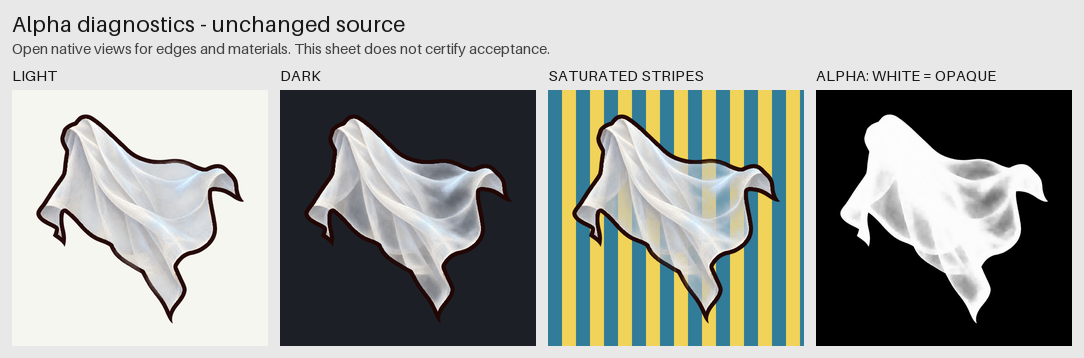
Example output: the alpha diagnostics sheet.